
Step 01
Add your apps and competitors
Find your app in the App Store, then add the competitors you care about. Discover keywords they rank for and track your own list across 60+ storefronts.
Find the keywords worth your budget. Bring App Store rankings, Apple Ads spend, and RevenueCat revenue together in one native Mac app.
The tools you use. A clearer picture.
Last 30 days Sample data
Apple Ads spend 30 days
$539.00Keyword revenue Estimated
$359.00Return on ad spend Revenue / spend
0.67×A keyword to watch
$92 spent. $241 in estimated revenue. Worth a closer look.
Explore the verdictssleep sounds 49%
meditation timer 34%
habit tracker 17%
Start with your biggest expenses.
| Keyword | Rank | Δ | Spend 30d | Revenue 30d | Verdict |
|---|---|---|---|---|---|
| habit tracker | #8 | ↑6 | $92 | $241 | Double down |
| meditation timer | #2 | — | $184 | $118 | Cannibalizing |
| sleep sounds | 200+ | — | $263 | $0 | Money pit |
| breathing exercises | #38 | — | $0 | — | Bid opportunity |
Illustrative data. Keyword revenue is estimated from each keyword’s share of daily ad spend.
How it works
Research competitors, follow your rankings, and review your ad spend in the same place.
Find your app in the App Store, then add the competitors you care about. Discover keywords they rank for and track your own list across 60+ storefronts.
Connect Apple Ads for spend, installs, and search popularity. Add RevenueCat for revenue estimates. Daily rank checks give you the organic context behind each paid keyword.
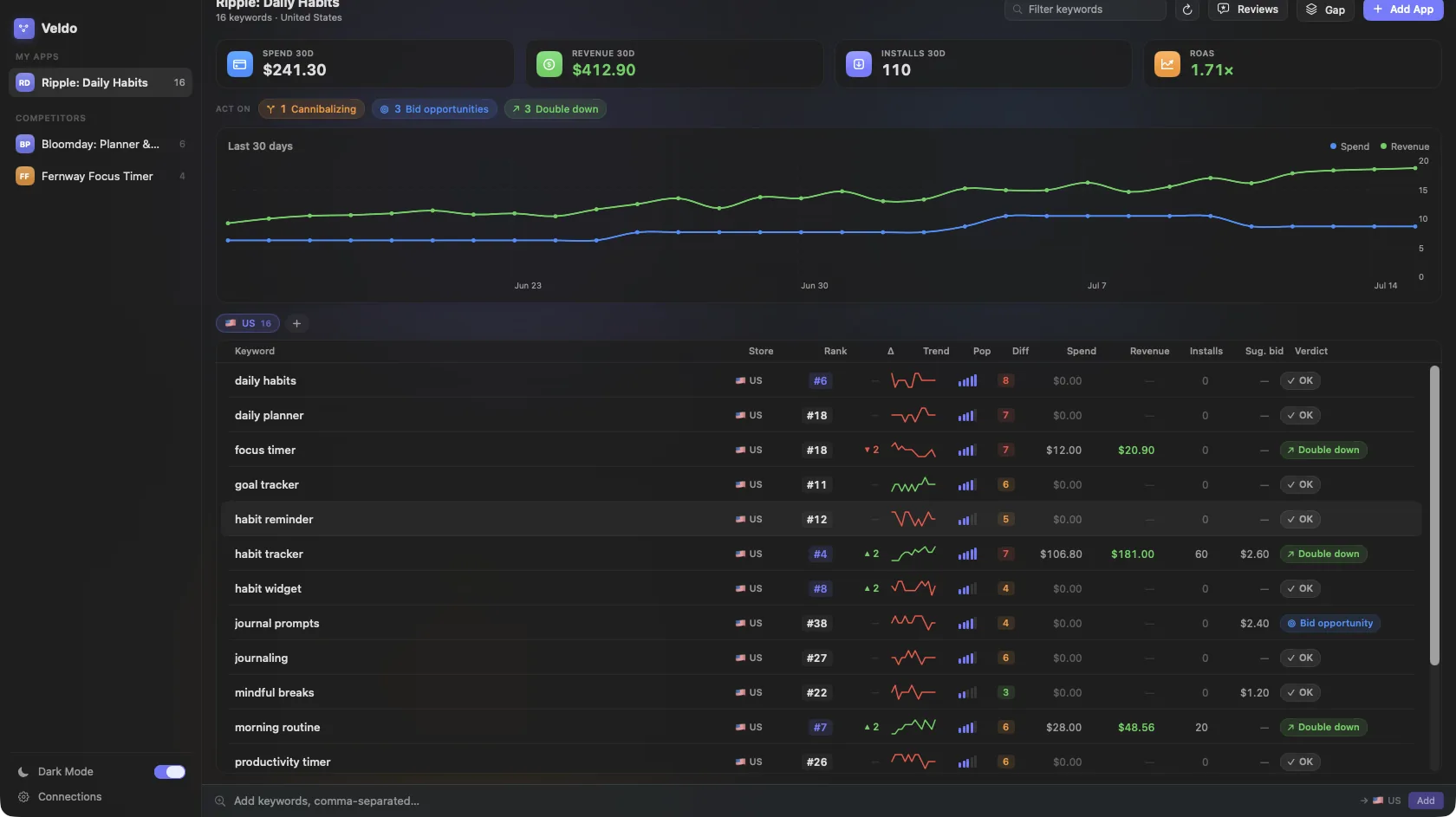
See which keywords look promising, which need a pause test, and which are spending without a return. Every verdict shows its evidence. You stay in control of campaign changes.
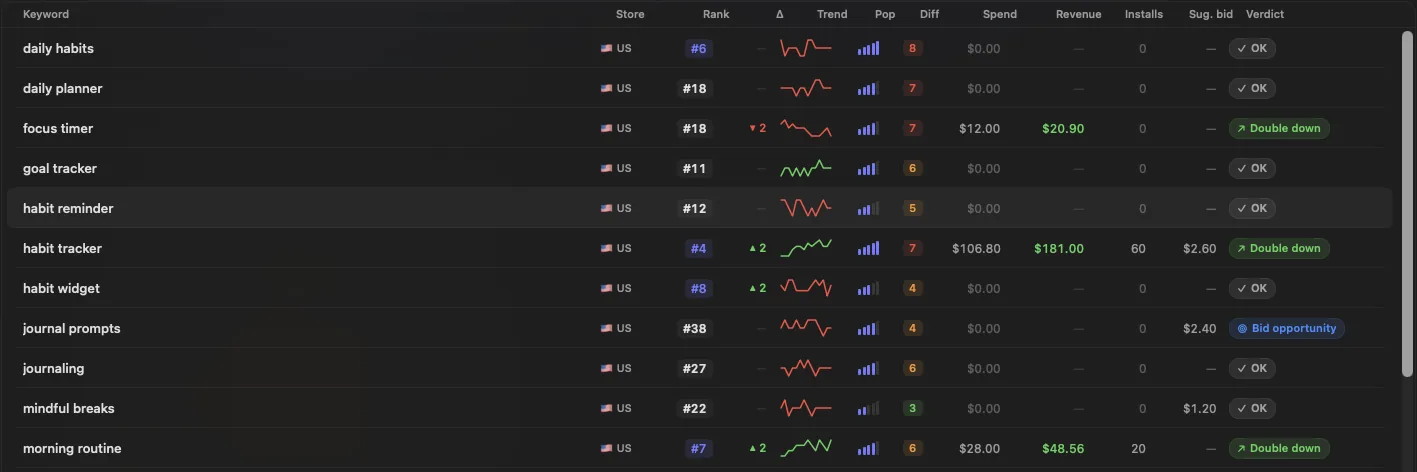
The verdict engine
Review organic rank, paid performance, and estimated revenue together. Each verdict gives you a starting point for your next test, with the numbers that led to it. Examples below use sample data.
You already rank near the top. This exact ad may be buying installs you would have won organically.
Demand is strong, organic visibility is weak, and no exact campaign is active.
This keyword keeps spending without producing attributed subscription revenue.
Attributed revenue is positive while the organic position continues to improve.
More than a rank tracker
Edit your title, subtitle, and keyword field for each market. Check character limits and keyword coverage, then push the draft to your next App Store version.
See your biggest ranking gains and drops across apps and markets. Release markers help you spot what changed after an update.
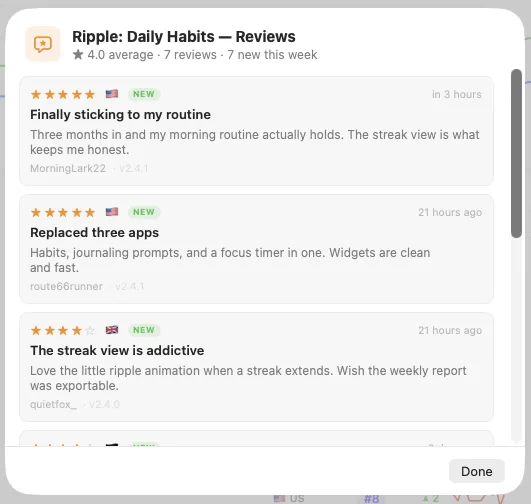
Read new reviews from every country you track. Get a notification when a new review arrives.
Add a market and bring your existing keyword list with you. Veldo tracks rankings separately for each storefront.
Understand keywords in other languages with Apple's on-device translation. No translation API key required.
Compare Apple's search popularity with a difficulty estimate based on the current top 10 results.
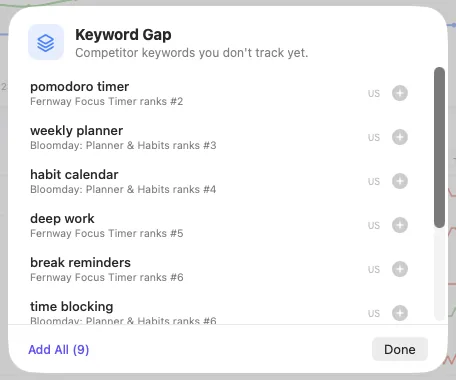
Find keywords your competitors rank for that you are missing. Add a promising term to your list in one click.
Check yesterday's spend and revenue without opening the app. Get notified when a keyword verdict changes.
Private by design
CLI & MCP
Ask your AI assistant about keyword performance or pull the numbers into a script. The CLI and MCP server read your local data without changing your campaigns.
veldo advisor 6446901002veldo mcpLocal data. JSON output. No campaign mutations.Set up the MCP server →
Simple pricing
Every feature, every app, every keyword. Choose monthly or yearly billing and keep the same price as your ad budget grows. Download Veldo, then subscribe to unlock it.
Guides
Compare tools by the work you need to do, the markets you track, and what you can spend.
Local data, background collection, and tools that fit how you work.
The three-signal model and the four verdicts: double down, bid opportunity, cannibalizing, money pit.
Relevance, Apple's 1-5 search popularity, competition, and intent: how to choose terms when nothing has happened yet.
Retention windows, uninstall rates, review recency, and how long to wait before judging a metadata change.
Which markets each label covers, why tier 1 costs more in Apple Search Ads, and why your own numbers beat the list.
FAQ
Veldo estimates each keyword’s revenue using its share of the app’s daily ad spend. It is an estimate, not a direct record of which keyword brought in each paying customer. Use it alongside ranks and installs when deciding what to test.
Veldo requires macOS 14 or later. Connect Apple Ads for paid data and optionally connect RevenueCat for revenue-aware verdicts.
No. Rank, popularity, spend, and install verdicts still work. Revenue fields remain unavailable until RevenueCat is connected.
Organic rankings refresh daily and are spread across the day to respect App Store request limits. Apple Ads and RevenueCat refresh more frequently.
Your spend, revenue, credentials, and database stay on your Mac. One optional exception: community keywords. Veldo clients pool anonymous rank observations (keyword text, storefront, and the public top-200 ranking) so everyone gets the reverse-ASO lookup Apple doesn't offer. No identifiers are attached, and you can turn it off in Settings → Community.
No. The MCP server is read-only by default. Agents cannot directly pause campaigns or change bids.
Connect your Apple Ads account in the native app. Veldo stores the credential in Keychain and collects data on your Mac.
Choose $8.99 monthly or $99 yearly. Annual billing saves $8.88 compared with 12 monthly payments. Both include every feature and all updates while your subscription is active. Cancel anytime, with a 14-day money-back guarantee.
Rankings, ad spend, and revenue on your Mac. From $8.99/month.
Buy Veldo